

Did you know that a well-set-up smart scale can significantly enhance your health tracking? The Garmin Index S2 Scale not only measures weight but also provides valuable insights into your body composition, making it a powerful ally in your wellness journey.
What You Will Learn
- The Garmin Index S2 Scale offers multi-user support, allowing the whole family to track their health metrics separately.
- Essential prerequisites include having the Garmin Connect app, a compatible Wi-Fi router, and a clear setup location.
- Step-by-step installation of the Garmin Connect app is crucial for syncing your scale with your health data.
- Troubleshooting Wi-Fi issues can prevent setup delays; ensure a strong signal and verify your password.
- Completing the onboarding process in the Garmin Connect app ensures accurate readings based on your personal metrics.
- Using Garmin Express is an alternative setup method, ideal for those preferring a desktop interface for installation.
Essential Steps for Setting Up Your Garmin Scale
The Garmin Index S2 Scale is more than just a measuring tool; it’s a smart device designed to help you track your health metrics effectively! With its sleek design and advanced technology, the scale provides insights into not only your weight but also your body fat percentage, muscle mass, and more. Let’s dive into the essential steps to get it set up correctly!
Garmin Index S2 Scale Features and Benefits
The Garmin Index S2 Scale is packed with features that can make tracking your health a breeze. It connects to your Garmin Connect app, enabling you to view your metrics in a user-friendly interface. Here are some key benefits of the Garmin Index S2:
- Multi-user support allows family members to track their progress separately.
- Advanced health metrics provide more than just weight; it includes body composition details.
- Wi-Fi connectivity means no need for Bluetooth pairing and ensures your data is synced seamlessly.
These features make the Garmin Index S2 a fantastic choice for anyone serious about monitoring their health journey. For a broader understanding of smart scales and their connectivity, you might find our guide on how to connect a smart scale helpful.
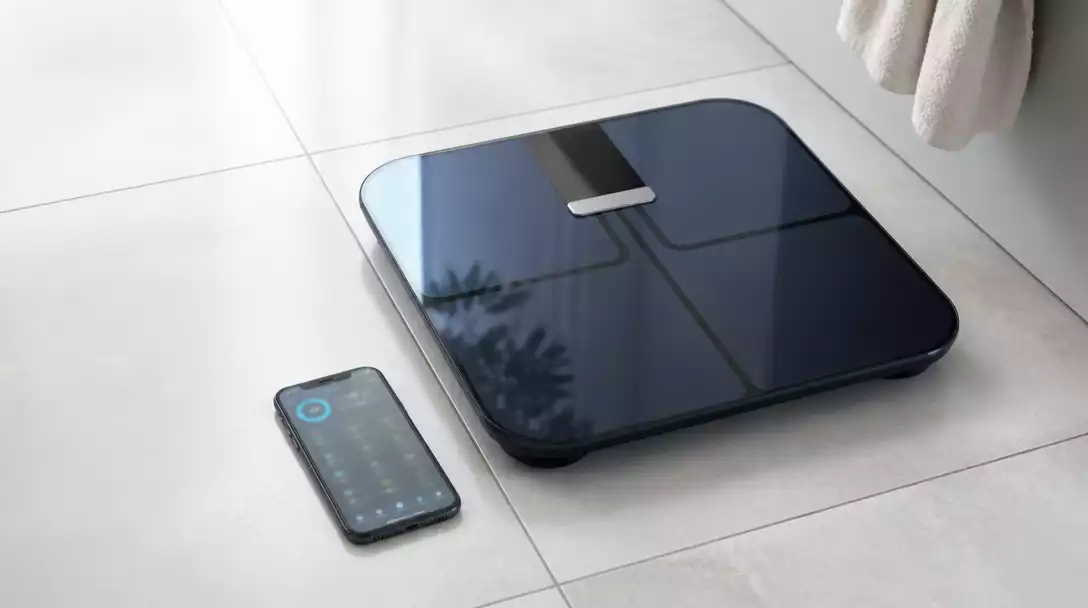
Prerequisites Before Setup
What You Need for Garmin Scale Setup
Before you start setting up your Garmin Scale, it’s essential to gather everything you need. This will ensure a smooth setup process without any hiccups. Here’s a list of requirements:
- Garmin Connect app installed on your smartphone
- A compatible Wi-Fi router for internet connection
- A Garmin account set up
- 4 AA batteries for powering the scale
- A good location for the scale, ideally on a hard, flat surface
Having these items ready will make your setup experience much more efficient, allowing you to focus on your health goals!
How to Install the Garmin Connect App
Installing the Garmin Connect app is your first step to connecting your Garmin Index S2 Scale. Here’s how to get it done:
- Open the app store on your smartphone (Google Play or Apple App Store).
- Search for “Garmin Connect”.
- Tap “Download” or “Install” to get the app on your device.
- Once installed, open the app and follow the on-screen prompts to set up your account.
With the Garmin Connect app installed, you’re just a few steps away from connecting your scale!
Connecting Your Garmin Scale to Wi-Fi
Pairing Your Scale with the Garmin Connect App
Next, it’s time to connect your Garmin Index S2 Scale to Wi-Fi through the Garmin Connect app. Follow these steps:
- Open the Garmin Connect app on your smartphone.
- Select “Add Device” and choose the Garmin Index S2 Scale from the list.
- Follow the on-screen prompts to connect the scale to your Wi-Fi network.
After pairing, the scale will start syncing your data automatically, giving you real-time insights into your health metrics!
Troubleshooting Wi-Fi Connection Issues
If you encounter any Wi-Fi connectivity issues, don’t worry! Here are some common problems and how to fix them:
- Weak Wi-Fi signal: Ensure your router is close enough to the scale.
- Incorrect Wi-Fi password: Double-check the password you entered.
- Network issues: Restart your router and try reconnecting.
Addressing these common issues can help you get your Garmin scale connected without delay!
Alternative Setup Using Garmin Express
If you prefer setting up your scale using a computer, you can do so with Garmin Express. Here’s how:
- Download and install Garmin Express on your computer.
- Connect your Garmin Index S2 Scale using a USB ANT Stick.
- Follow the prompts in Garmin Express to complete the setup.
This method is particularly useful if you’re more comfortable using a desktop or laptop for setup!
First-Time Activation and Device Onboarding
After you have set up your scale, it’s essential to complete the onboarding process. This includes entering your personal details such as height, weight, and fitness goals. Here’s a quick guide:
- Open the Garmin Connect app and select “My Devices.”
- Choose your Garmin Index S2 Scale.
- Follow the prompts to input your personal information.
Completing the onboarding process will ensure accurate readings and personalized feedback from your scale! If you ever need to reset your scale’s data or settings, you might find our guide on how to reset a scale useful.
Pro Tip
To maximize the accuracy of your Garmin Index S2 Scale readings, try to weigh yourself at the same time each day—preferably in the morning before meals. This consistency helps in tracking your progress more effectively.
Frequently Asked Questions About Setting Up Your Garmin Index S2 Scale
Here are some common questions to help you further understand the setup and use of your Garmin Index S2 Scale:
- Q: What health metrics does the Garmin Index S2 Scale track?
- A: The Garmin Index S2 Scale tracks not only your weight, but also body fat percentage, muscle mass, bone mass, and body water percentage.
- Q: Can multiple users track their data on one Garmin Index S2 Scale?
- A: Yes, the Garmin Index S2 Scale supports multiple users, allowing each family member to track their individual health metrics separately through their own Garmin Connect accounts.
- Q: Is the Garmin Connect app required for the scale to work?
- A: While the scale can take basic weight measurements without the app, the Garmin Connect app is essential for detailed tracking, syncing data, viewing body composition metrics, and managing user profiles.
- Q: What should I do if my Garmin Index S2 Scale isn’t connecting to Wi-Fi?
- A: First, ensure your Wi-Fi router is within range and has a strong signal. Double-check the Wi-Fi password entered in the Garmin Connect app. If issues persist, try restarting your router and the setup process.
- Q: Can I set up the Garmin Index S2 Scale without a smartphone?
- A: Yes, you can use Garmin Express on a computer as an alternative setup method. This requires downloading Garmin Express and connecting the scale via a USB ANT Stick.
Final Thoughts on Setting Up Your Garmin Scale
Setting up your Garmin Index S2 scale is a straightforward process that can greatly enhance your health journey. Throughout this article, we’ve covered essential steps, from getting familiar with the scale’s features to troubleshooting common issues. Following these setup steps carefully ensures you start off on the right foot with your health metrics!
Remember, taking the time to correctly position your scale and connect it to the Garmin Connect app is crucial. If you face any challenges, don’t hesitate to revisit the troubleshooting sections for quick solutions. Having a solid foundation with your scale will allow you to fully utilize its capabilities in tracking your health and fitness goals. For general guidance on setting up any bathroom scale, refer to our comprehensive article on how to set up a bathroom scale.
Call to Action: Get Started with Your Garmin Scale Today
Now that you have a comprehensive understanding of the setup process, it’s time to dive in! Don’t wait any longer—start the setup of your Garmin Index S2 scale today and take the first step towards improving your health. Experience the benefits of tracking your body composition and setting personal goals that align with your wellness journey!
- Download the Garmin Connect app.
- Connect your scale to Wi-Fi.
- Create your personal profile.
- Start tracking your health metrics.
Let’s get started and make your health a priority together! If you have any questions or need assistance during the setup process, feel free to reach out. I’m here to help!
Recap of Key Points
Here is a quick recap of the important points discussed in the article:
- The Garmin Index S2 Scale offers multi-user support for family tracking.
- Ensure you have the Garmin Connect app installed before setup.
- Connect the scale to a compatible Wi-Fi network for seamless data syncing.
- Troubleshoot common Wi-Fi issues by checking the signal strength and password accuracy.
- Complete the onboarding process by entering personal details for accurate readings.





