

Setting the stage for a successful experience with your Hume Scale begins with understanding the essential steps. Are you ready to optimize your health journey?
What You Will Learn
- Properly place your Hume Scale on a hard, flat surface to ensure accurate readings.
- Download the Hume Health app from the App Store or Google Play for enhanced functionality.
- Create your Hume Health account to track progress and access personalized insights.
- Understand measurement theory to improve the accuracy of your weigh-ins.
- Sync your scale with the app for optimal performance and data management.
- Regularly update user profiles in the app to better track individual health trends.
Essential Steps for Setting Up Your Hume Scale
Setting up your Hume Scale correctly is crucial for accurate measurements and optimal use. One of the first steps is ensuring you place the scale on a hard, flat surface. Carpets and uneven flooring can interfere with the readings, so look for a stable spot like a tiled or hardwood floor. This simple adjustment can make a significant difference in your results!
When you’re ready to set up your environment, remember that a clutter-free area near a power source can also help. This minimizes distractions and keeps your focus on using the scale effectively. For more general advice on preparing your weighing area, consider reading our guide on how to set up a bathroom scale.
Preparing Your Environment for Hume Scale Placement
To ensure the best performance from your Hume Scale, it’s essential to consider the placement carefully. The scale needs a solid foundation, which is why using a hard surface is non-negotiable. Avoid carpets, as they can cause inaccurate readings due to their forgiving nature. Ensure the area is also free from obstructions that might affect your balance.
- Select a hard, flat surface like tile or wood.
- Clear the area of any clutter or obstacles.
- Ensure the scale is level and stable.
By taking these simple steps, you set the stage for a seamless weighing experience! It’s worth it to put in the effort to create the right environment.
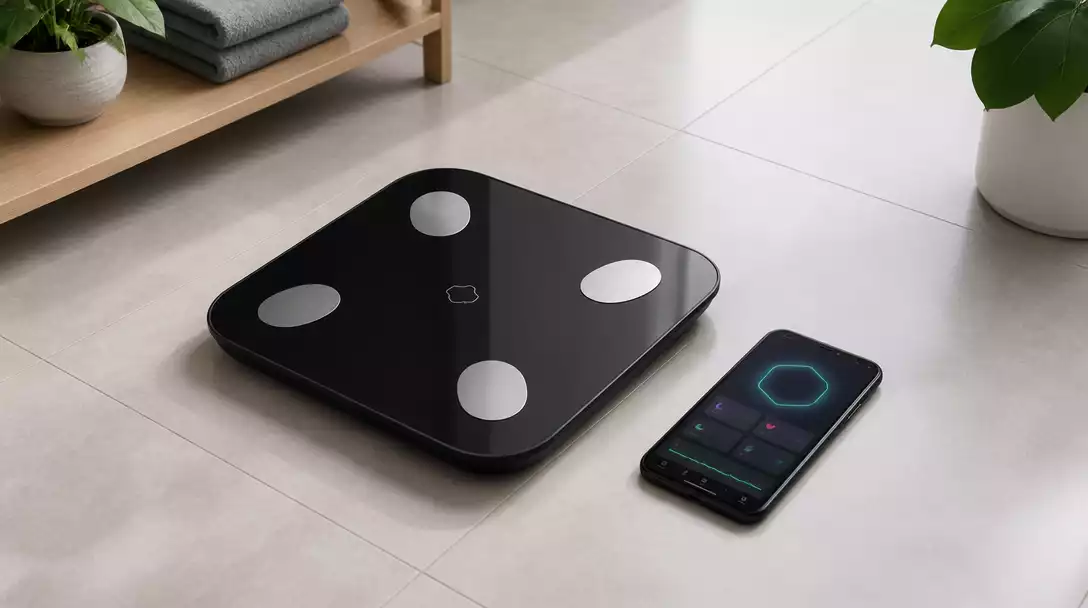
Getting Started: Downloading the Hume Health App
Once your scale is in place, it’s time to get the Hume Health app. Whether you’re using an iOS or Android device, finding and downloading the app is easy! Simply head over to the App Store or Google Play and search for “Hume Health.” You’ll see the app pop up right away.
- Open the App Store (iOS) or Google Play Store (Android).
- Search for “Hume Health.”
- Download and install the app to your device.
Having the app ready on your phone will make the setup process much smoother, giving you access to features and data all in one place!
Creating Your Account for Hume Health
After installing the app, it’s time to create your Hume Health account. Open the app and follow the prompts to sign up. You’ll need to provide some basic information, like your email address and a password. This account will help you track your progress and access personalized insights.
- Open the Hume Health app.
- Select “Create Account.”
- Enter your email, create a password, and follow any additional prompts.
Once your account is set up, you’ll be ready to dive into using your Hume Scale and exploring its capabilities. Trust me, having your data organized is a game-changer!
Measurement Theory in Hume Scale Use
Now that you’re ready with your scale and app, let’s touch on measurement theory. In simple terms, this refers to the principles that underlie how measurements are taken and interpreted. Understanding these principles is key to using your Hume Scale effectively.
By grasping measurement theory, you can appreciate why certain practices, such as standing still while weighing yourself, are so important. It helps ensure that the readings are as accurate as possible, allowing you to track your progress over time. For more tips on accurate measurements, check out our article on how to properly stand on a scale.
Pro Tip
Did you know? Properly calibrating your Hume Scale is essential for accurate measurements. To do this, make sure to follow the manufacturer’s instructions for calibration before your first use. This ensures that the scale is set to zero and can provide you with precise readings every time you step on it!
Frequently Asked Questions About Your Hume Scale Setup
- Q: Why is placing the Hume Scale on a hard, flat surface so important?
- A: Placing the Hume Scale on a hard, flat surface ensures accurate readings. Carpets and uneven flooring can cause discrepancies in measurements, leading to inaccurate data for your health tracking.
- Q: Where can I download the Hume Health app?
- A: You can download the Hume Health app from the App Store for iOS devices or the Google Play Store for Android devices. Simply search for “Hume Health” and install it on your device.
- Q: What information do I need to create a Hume Health account?
- A: To create a Hume Health account, you’ll typically need to provide basic information such as your email address and a password. Follow the in-app prompts for any additional details required.
- Q: What is “measurement theory” in the context of using a Hume Scale?
- A: Measurement theory refers to the principles behind how measurements are taken and interpreted. Understanding it helps you ensure accurate readings by following practices like standing still and barefoot during weigh-ins, providing reliable data for tracking your health.
- Q: How do I ensure my Hume Scale data is accurate and up-to-date?
- A: To ensure accurate and up-to-date data, regularly update your user profiles in the Hume Health app, sync your scale data consistently, and utilize the app’s analytics features for deeper insights. Proper calibration before first use is also essential.
Final Thoughts on Using Your Hume Scale Effectively
As we wrap up this guide, it’s crucial to remember the essential steps for setting up and troubleshooting your Hume Scale. From ensuring a flat surface during placement to connecting via the app, these actions help you achieve accurate results. Plus, keeping your scale updated and synced will greatly enhance your experience!
- Place your Hume Scale on a hard, flat surface.
- Download the Hume Health app from the App Store or Google Play.
- Pair your scale using the app, not your phone’s Bluetooth settings.
- Perform your first weigh-in barefoot and standing still.
Don’t forget to troubleshoot common issues like Bluetooth connectivity and battery concerns. Regular maintenance will keep your scale working efficiently and accurately. If you ever need to reset your device, our guide on how to reset Hume scale can provide detailed instructions.
Join the Conversation: Share Your Hume Scale Experience
I’d love to hear about your own experiences with the Hume Scale! Have you encountered any challenges during setup? Or maybe you have tips for getting the most out of your scale? Feel free to leave a comment or question below. This community thrives on shared knowledge, and your insights could help others on their journey!
Leveraging Data Collection Methods with Your Hume Scale
Your Hume Scale isn’t just a measuring tool; it’s a gateway to understanding your health trends over time. By effectively utilizing data collection methods, you can enjoy a more personalized experience. Here are some tips to maximize your scale’s capabilities:
- Regularly update user profiles to track individual progress.
- Sync data consistently to avoid discrepancies.
- Utilize the app’s analytics features for deeper insights.
By following these strategies, you can ensure that you’re not only measuring but also understanding your health data in a meaningful way. Let’s make the most of your Hume Scale together!
Recap of Key Points
Here is a quick recap of the important points discussed in the article:
- Place your Hume Scale on a hard, flat surface for accurate readings.
- Download the Hume Health app from the App Store or Google Play to enhance your experience.
- Create an account in the Hume Health app for tracking progress and personalized insights.
- Understand measurement theory to ensure accurate readings by standing still during weigh-ins.
- Regularly update user profiles and sync data to maintain accuracy and track health trends effectively.





